Add Book
This is the master for 'Books'. With this form user can add books with various information.
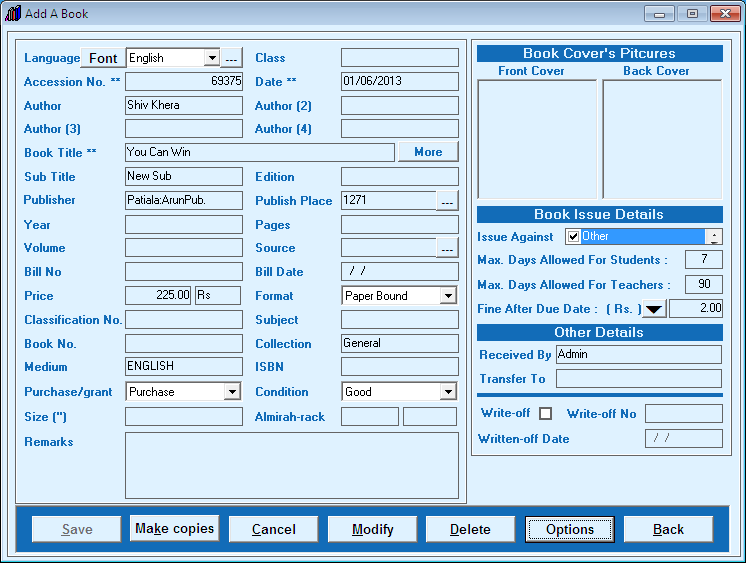
- Set font and language according to your requirements.
- Enter related information which you have regarding book.
- Authors, Book Title, Publisher, Publish Place and source all these fields will be auto store in master list.
- You can store Images of front and back cover of book by double clicking on space of picture
- Issue against - this is a check list you can issue book against checked list like student, teacher, you can also mark as check "Not For Students'
- Enter maximum days allowed for students.and teachers.
- You can set fine for particular book.
- If you have more than one copy of same titles then click on 'Make Copies' button
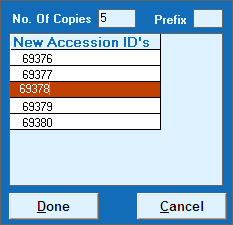
- Enter No of copies and press enter button. You can also use prefix for Accession no. if you want to change Accession No. from series then double click on desired Accession No. and change it followed by Enter Button.
- You can also set position of tabs by click on 'Options' button
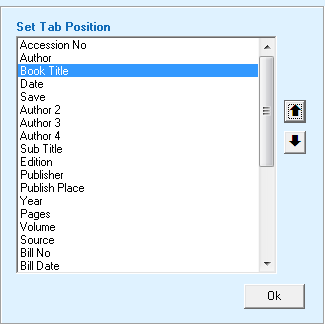
- Just click on desired field and move it with help of up/down arrow buttons according to accession register (hard copy)
Created with the Personal Edition of HelpNDoc: Generate EPub eBooks with ease


